
Under the wave of digital transformation, enterprises face pressure to migrate massive legacy systems to the cloud. As a cloud architect, I often see decision-makers oversimplify cloud migration as merely "moving data." In reality, cloud migration is a precise evolution concerning Total Cost of Ownership (TCO) and business agility. Without the right strategy, the aftermath may result in bloated architecture or runaway costs.
This article breaks down the industry-recognized AWS 7R migration strategies and reveals how to leverage physical hardware tools such as Storage Gateway and the Snowball family to complete an elegant and efficient digital upgrade within bandwidth and physical space constraints.
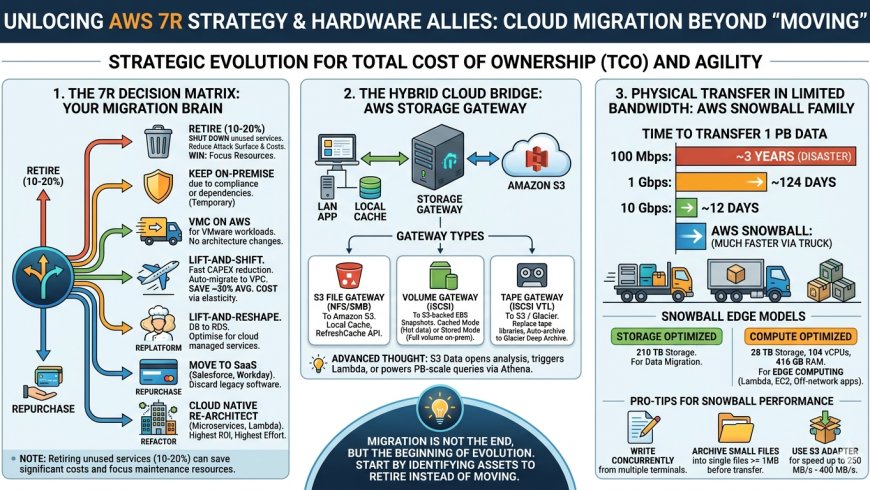
Strategic Thinking Before Migration: The 7R Decision Matrix
After entering the Discovery and Assessment phases, architects must determine the fate of each asset. This is not just a technical choice — it is a business decision.
- Retire: Shut down services that are no longer needed.
- Retain: Temporarily keep on-premises due to compliance, security, or technical dependencies.
- Relocate: For example, migrate VMware workloads to VMware Cloud on AWS without changing the architecture.
- Rehost: Known as "Lift and Shift" — move workloads as-is.
- Replatform: Known as "Lift and Reshape" — for example, migrating databases to RDS.
- Repurchase: Abandon legacy software and move to SaaS (e.g., Salesforce or Workspace).
- Refactor: Rewrite using cloud-native technologies (microservices, Lambda) — highest ROI but also the greatest investment.
The Wisdom of Letting Go: 10%–20% of Services Should Simply Be "Retired"
In a migration blueprint, Retire is often the strategy with the highest return on investment. According to practical statistics, approximately 10%–20% of services within an enterprise have already lost their business value.
According to AWS's Shared Responsibility Model, the more resources you maintain, the heavier the security burden. Through the Retire strategy, we can directly shrink the attack surface, saving migration and ongoing computing costs while allowing the operations team to focus on core business security.
"Retiring services (approximately 10%–20%) can reduce costs and focus attention on the resources that must be maintained."
Save Money Without Touching the Code? The Immediate Power of Rehost
For enterprises prioritizing migration speed, Rehost (Lift and Shift) is the fastest way to reduce capital expenditure (CAPEX). This strategy mirrors physical servers or virtual machines (VMs) directly to the cloud.
While this does not yet fully leverage cloud-native advantages, its value should not be underestimated:
- Low barrier and high automation: Using AWS Application Migration Service, physical machines can be quickly transferred to a VPC.
- Significant cost optimization: Leveraging cloud elasticity and pay-as-you-go pricing, even without optimization, can save an average of up to 30% in costs.
The Hidden Bridge of Hybrid Cloud: Deep Applications of Storage Gateway
During migration or in a hybrid cloud architecture, Storage Gateway is the critical bridge connecting on-premises data to S3. It allows on-premises applications to access cloud data with low latency and supports Active Directory (AD) integration, ensuring file access complies with permission policies.
|
Gateway Type |
Access Protocol |
Cloud Backend Storage |
Key Technical Points |
|
S3 File Gateway |
NFS / SMB |
Amazon S3 |
Provides local cache, supports RefreshCache API to sync S3 changes. |
|
Volume Gateway |
iSCSI |
S3-backed EBS Snapshots |
Cached mode (hot data only) and Stored mode (full copy on-premises). |
|
Tape Gateway |
iSCSI VTL |
S3 / Glacier |
Replaces physical tape libraries, automatically archives to Glacier Deep Archive. |
Architect's Note: The S3 File Gateway caching mechanism only caches recently accessed data, allowing on-premises infrastructure to access virtually unlimited cloud storage with minimal hardware footprint. Through S3 Lifecycle Policies and Cross-Region Replication (CRR), automated archiving and geo-redundant disaster recovery are easily achieved.
The Paradox of Physical Transfer Speed: Why Courier Is Faster Than the Internet
When data volumes cross the 100 TB threshold, network bandwidth limitations become apparent. In certain scenarios, shipping physical hard drives is far faster than fiber optic transmission.
Time required to transfer 1 PB of data:
- 100 Mbps bandwidth: approximately 3 years (a disaster for enterprises)
- 1 Gbps bandwidth: approximately 124 days
- 10 Gbps bandwidth: approximately 12 days
If your migration timeline cannot wait 12 or more days, AWS Snowball is the optimal solution.
Snowball Edge Specifications and Edge Computing Capabilities
Snowball is not just a hard drive — it comes in two key models for different business scenarios:
- Storage Optimized: 210 TB storage capacity, ideal for pure data migration.
- Compute Optimized: 28 TB storage, 104 vCPUs, and 416 GB RAM. Runs Lambda or EC2 in network-isolated environments (offshore platforms, remote mining sites), enabling edge computing.
Professional Architect Migration Optimization Tips (Pro-Tips)
- Concurrent writes: Perform write operations to Snowball from multiple terminals simultaneously.
- File packaging: Compress many small files into zip archives of at least 1 MB before transferring.
- Use S3 Adapter: Increases transfer rate to 250 MB/s–400 MB/s when maximum speed is required.
Advanced Architect Thinking: From On-Premises Cache to Cloud-Native Analytics
Once data enters S3 via Storage Gateway or Snowball, it opens the door to a second evolution of data value. Use S3 Events to trigger Lambda for real-time processing; run PB-scale queries directly on S3 with Athena and Redshift Spectrum without expensive ETL; build read-only replicas for global branch offices to access master data with low latency.
Conclusion: Migration Is Not the End, But the Beginning of Evolution
Cloud migration is the art of making the right choices. From the 7R strategy, to Storage Gateway hybrid cloud bridging, to Snowball breaking through physical constraints — every tool is designed to reduce TCO and enhance resilience.
Before taking your next step, review your asset inventory: "In your migration blueprint, which asset is the dead weight that should actually be Retired rather than migrated?" Identifying these resources is your first step from merely "moving" to true cloud-native evolution.


